
Developing an Enterprise Geodatabase for Wildlife Sampling at George Washington Birthplace National Monument
Problem
The objective of this project was to create a functional enterprise geodatabase for use in custom web service applications, provided several tabular datasheets. Additionally, the database needed to exist in a format allowing for advanced SQL queries between related datasets. Finally, edits to certain features via the web application needed to be reflected in the original, server-hosted database. Data included a list of collection sites, site visits, observed gamefish, observed non-gamefish, and species information for a study conducted in the George Washington Birthplace National Monument, Colonial Beach, Virginia.
Analysis Procedures
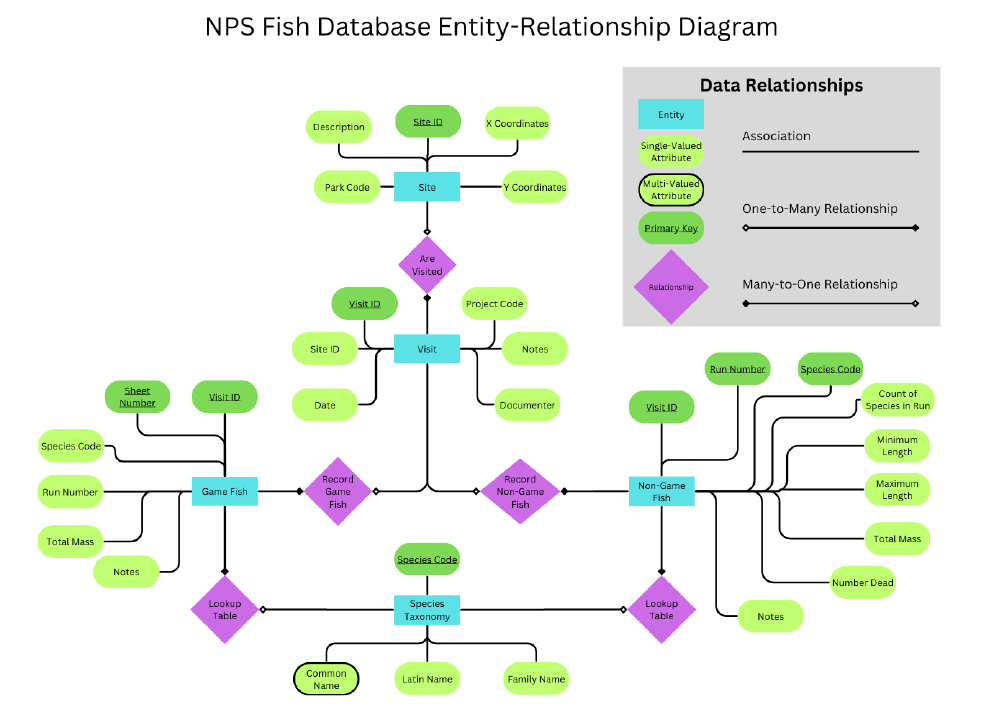
The project began with designing an entity-relationship (ER) diagram as well as a Unified Modeling Language (UML) diagram to represent the relationships between five tabular data entities. Based on this, I created the database schema in PostgreSQL using SQL DDL statements, defining primary and foreign keys to establish relationships between tables. Once the structure was in place, I used DML statements, specifically COPY commands, to load the fish inventory data into PostgreSQL.
The relational database structure allowed me to create views extracting the site locations of both gamefish and non-gamefish observations. The X,Y coordinates for each site location where an observation occurred were used as the input in ArcGIS Pro’s XY Table to Point tool to create relevant feature classes. I created an enterprise geodatabase in ArcGIS Pro, incorporating the gamefish and non-gamefish feature classes, as well as additional reference data like roads and buildings. The geodatabase was connected to the server-hosted PostgreSQL database, and published as a map service for use in the web application. Once published as a map service, the content of the database was used to create the web application.
Results
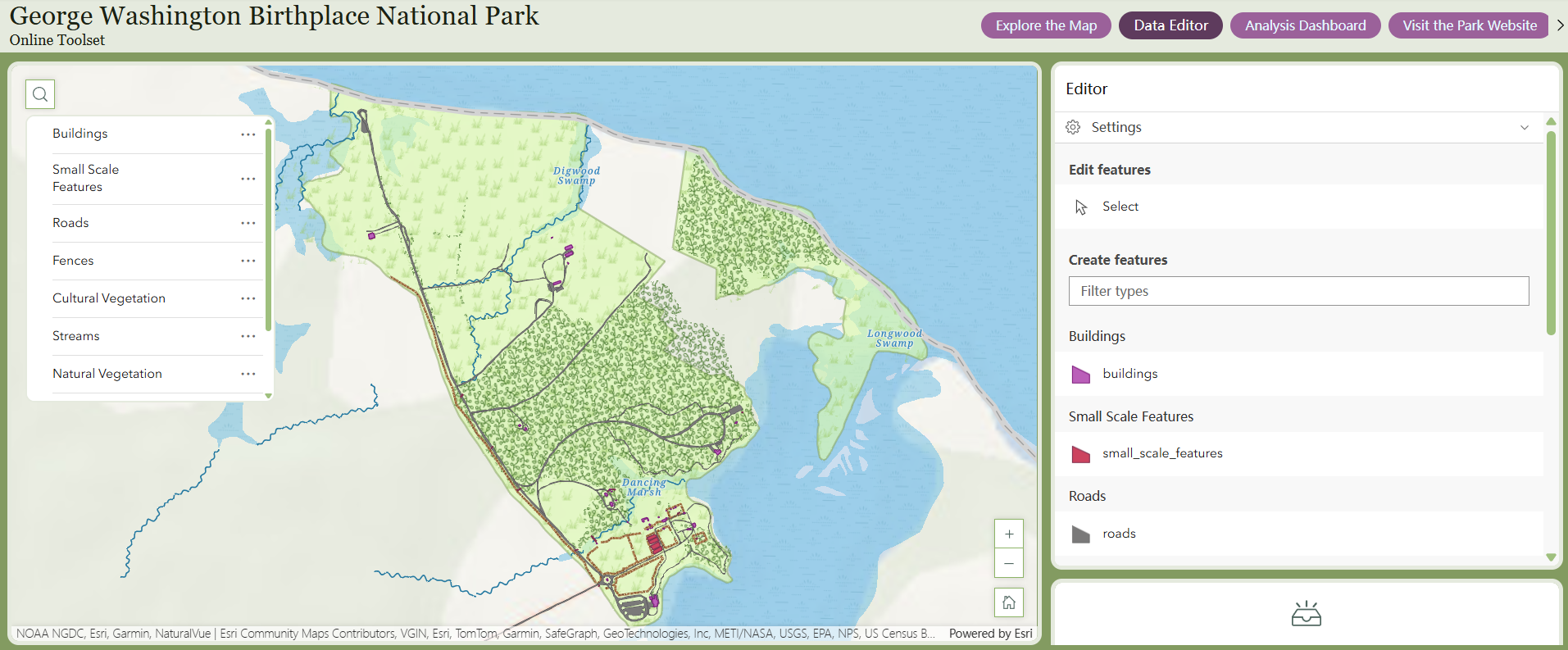
The database structure successfully maintained referential integrity, allowing for reliable data entry and querying. The resulting Experience Builder web application allowed for editing of feature classes; for example, users could add gamefish locations that were automatically added to the original feature class. The application also included several analysis tools using user inputs to characterize data patterns and statistics.
Reflection
Completing this project informed my understanding of maintaining complex relational databases in a clear and structured manner. The process of designating specific users who could maintain and edit each element of the database demonstrated key security constraints and considerations for multi-user databases. In the past, the data I’ve used in web applications had been shared directly from ArcGIS Pro. This data either needed to be edited in ArcGIS Pro and reuploaded to an online platform, or edited online, thus rendering the original database out of date. A similar process can be applied to future datasets both to maintain referential integrity of related data and to ensure data relevance for multiple users across software platforms.
Creating a Simple Geodatabase for Complex Queries of Forest Research Data
Problem
The goal of this project was to create a system relating forest management data to a new dataset containing information about research and teaching projects taking place in forests managed by North Carolina State University’s College of Natural Resources. Ultimately, this database will be used to provide users the opportunity to generate reports of forest projects given custom input. For example, a user may want to identify projects that took place in Forest A and discussed water resources.
Analysis Procedures
After procuring and cleaning forest management data including forest polygons, forest line boundaries, and forest stands, I added this data to a new file geodatabase. I added relationship classes to define relationships between features using primary and foreign keys. To avoid the need for a dedicated server and to keep the database as simple as possible, I included as many fields as possible that may be relevant to queries within the attribute table of the project feature.
Results
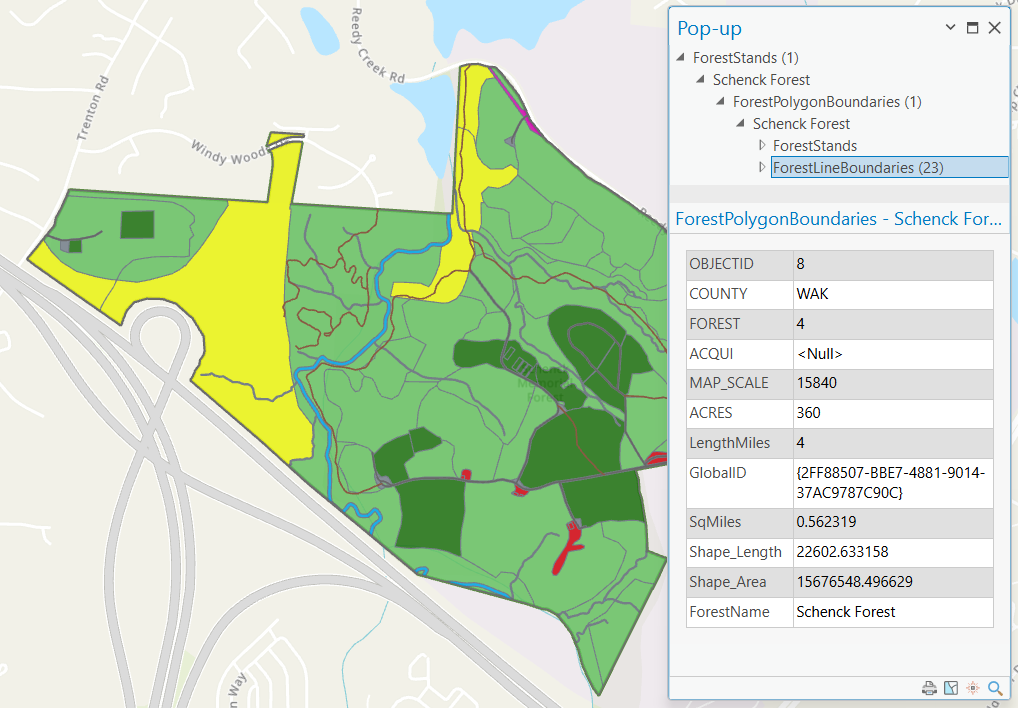
The image below shows a pop-up for a selected forest stand. Beyond the attributes for the stand, the pop-up also shows the connected features. The stand exists within Schenck Forest, which contains both stands and line boundaries. Selection of these features within the pop-up will also display their relevant attributes.
Reflection
I initially planned to use an enterprise geodatabase for this project; however, several challenges arose which led to my decision to return to a file geodatabase structure. There is only one other user managing this data, so there was no need to enable editing across multiple devices or users. Additionally, because the data already existed in spatial rather than solely tabular format, I could define relationships directly within ArcGIS Pro. This experience highlighted that highly technical solutions aren’t always the most effective; simplicity is often just as valuable. Building the geodatabase and defining relationships helped me understand how to design portable, functional systems for custom queries and user-facing applications. It also reinforced the importance of aligning technical design with actual project needs — an approach I’ll carry forward in future work with spatial databases.
 GIS Portfolio