
Developing a Web-Based Archive for Forestry Research at NC State
Spring 2025
Problem
Across NC State’s College of Natural Resources (CNR)-managed forests, decades of research and teaching have been conducted without a centralized way to store, visualize, or query information about those projects. Faculty and students interested in viewing or furthering this research can benefit from contextual and spatial overviews of what has been done, where, and by whom. These records exist in several formats – some results are housed in journal articles, while others exist in memory alone. My capstone project aimed to create a scalable, spatially-enabled archive that documents this work and provides users a platform to filter projects and generate custom reports. Moreover, the project aims to solve a key obstacle in the archive process: data collection. Finally, I sought to provide a workable solution completely independent of an enterprise or ArcGIS server environment, as the future availability of those resources was not guaranteed.
Analysis Procedures
I began by designing a Survey123 form to collect project information, including title, project type, location, timeline, number of students involved, associated forest, tags, and contact information. The original iteration of the survey offered the option to select either a full forest or draw a custom area for the project’s extent. Since Survey123 only supports the storage of one type of geometry per survey, geometry was recorded only for custom boundaries. Full-forest geometry was drawn in later via a custom Python tool in ArcGIS Pro. The tool uses the Survey123 file geodatabase .zip file (downloaded by the user to reflect most recent results), the forest boundaries polygon feature class, and the project polygon feature class as inputs. Upon running the tool, features deemed not to be duplicates are appended to the feature layer with cleaned attributes and geometry copied from the boundaries layer.
This tool remains present in the ArcGIS Pro project and is useful for copying features to ArcGIS Pro for backup. However, with the need for this data to be present in the final Experience Builder application, an updated “live” version of the survey was created to only accept user-drawn boundaries. Once the creation of a feature is initialized, the user may select a forest to zoom to its boundaries, then draw the approximate area of the study. The resulting layer can thus be directly linked to Experience Builder without the need to copy the data to ArcGIS Pro and republish to ArcGIS Online. This allows the application to remain up-to-date without frequent data refresh.


To facilitate exploration of forest projects, the resulting project layer is published to ArcGIS online along with custom-symbolized contextual forest layers and visualized in an Experience Builder web application. The application uses a custom query tool to allow users to filter projects by forest, tags, project type, or date range. All search fields are optional in order to allow flexible queries. Upon running the query, the map zooms to the extent of the selected projects and a live chart displays the breakdown of result projects taking place in each forest. Resulting project attributes are displayed, with the option to view and download any attachments such as journal publications associated with each project.

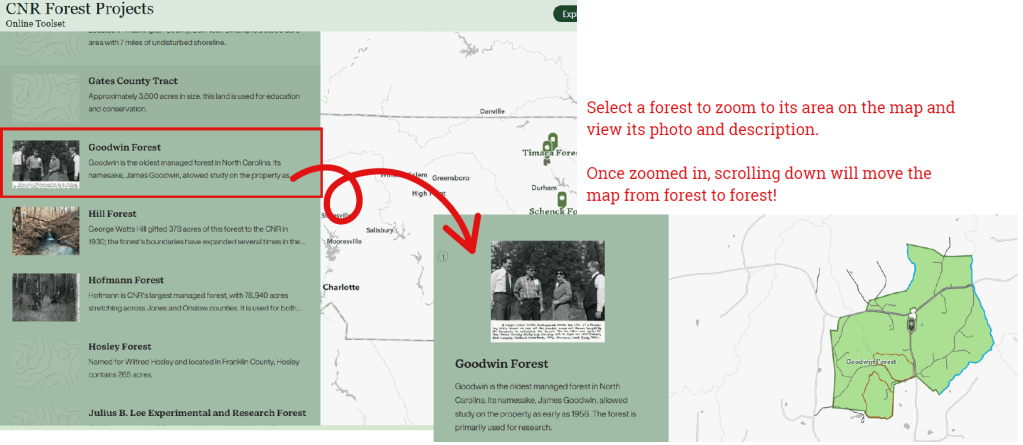
As a final component of the online application, I created a short StoryMap allowing users to “tour” each forest. After a brief introduction to the managed-forest program, users can select a forest to zoom to its location on the map, read a short description, and view a photo.
Results
The final application includes an exploratory-style map of the forests complete with contextual layers like roads and tree cover, the custom project query tool, the Survey123 application used to add project information, a guided StoryMap forest tour, and an embedded link to NCSU’s forests and facilities website. The system is designed to be maintained by CNR staff and can evolve over time with minimal disruption to the core workflow.

Reflection
This project required me to design a complete GIS workflow that could be used and maintained beyond the scope of my own involvement. I had to think through each step carefully, from how data would be submitted and stored to how it would be updated, accessed, and visualized by other users. A major focus was ensuring long-term usability without depending on enterprise infrastructure, which meant relying on tools available through ArcGIS Pro and ArcGIS Online.
Some challenges included Survey123’s geometry constraints, building a script tool that could update the database reliably, and configuring a web application that would allow for meaningful queries. While not every feature was straightforward to implement, the process of building, testing, and refining the system helped me strengthen several facets of my GIS skillset. Throughout the project, I was continually faced with questions asking what features and technologies were available to me, to my client, and were sustainable long-term. The experience gave me a clearer understanding of how to design GIS tools within real-world constraints, and that perspective will carry into future projects regardless of topic or setting.
 GIS Portfolio